
ARK Electronics ARKV6X
PX4 v1.13WARNING
PX4 does not manufacture this (or any) autopilot. Contact the manufacturer for hardware support or compliance issues.
The USA-built ARKV6X flight controller is based on the FMUv6X and Pixhawk Autopilot Bus open source standards.
With triple synced IMUs, data averaging, voting, and filtering are possible. The Pixhawk Autopilot Bus (PAB) form factor enables the ARKV6X to be used on any PAB-compatible carrier board, such as the ARK Pixhawk Autopilot Bus Carrier. The ARKV6X must be used with a carrier board, which provides all of its connectors for power, peripherals and outputs.
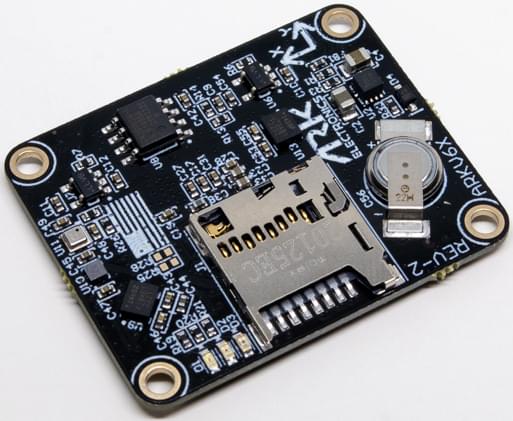
INFO
This flight controller is manufacturer supported.
Specifications
Processor
- Main FMU processor: STM32H743IIK6 (Arm Cortex-M7, 480 MHz, 2 MB flash, 1 MB RAM)
- IO processor: PX4IO v2, on carriers that fit one
Sensors
- IMU:
- ARKV6X: 2× InvenSense ICM-42688-P (SPI2, SPI3), InvenSense IIM-42652 (industrial, SPI1)
- ARKV6X Extended Range: 3× InvenSense IIM-42653 (SPI1, SPI2, SPI3), for a 4000 degrees per second (dps) gyroscope and 32 g accelerometer range. The Extended Range needs PX4 v1.14 or later.
- Barometer: Bosch BMP390 (I2C4)
- Magnetometer: Bosch BMM150 (I2C4)
- Heater: 1 W, keeps the sensors warm in extreme conditions. It regulates on the temperature of the IIM-42652 (IIM-42653 on the Extended Range).
Interfaces
- PWM outputs: 8 FMU outputs, plus 8 from PX4IO on carriers that fit one (see PWM Outputs)
- Serial ports: 8 (
GPS1,GPS2,TELEM1,TELEM2,TELEM3,UART4/I2C3(TELEM4), PX4IO orRC/SBUS, Debug Console) - I2C buses: 4 (I2C4 internal, the rest external)
- SPI buses: 5, of which SPI6 is external with 2 chip selects and 2 data-ready lines
- CAN buses: 2
- Ethernet: 100 Mbps
- USB: Yes
- RC input: Yes
- Parameter storage: FRAM (FM25V02A) on SPI5
- SD card: MicroSD slot
- LED indicators: Yes
Electrical Data
- Input voltage: 5 V nominal (4.8 V minimum, 5.5 V absolute maximum)
- Current draw: 500 mA (300 mA main system, 200 mA heater)
- Power monitoring: 2 digital power inputs (INA226 by default)
Mechanical Data
- Dimensions: 36 × 29 × 5 mm
- Mounting hole spacing: 31.4 × 24.4 mm (4 × Ø2.3 mm holes)
- Weight: 5.0 g
- Form factor: Pixhawk Autopilot Bus (PAB)
- Operating temperature: -10 °C to +60 °C
Where to Buy
Order from ARK Electronics (US):
Pinouts
For the pinout of the ARKV6X see the DS-010 Pixhawk Autopilot Bus Standard.
Power
The ARKV6X is powered with 5 V from its carrier board, through the PAB connector.
On the ARK PAB Carrier, power comes in on POWER1 and POWER2, which are 6-pin Molex CLIK-Mate connectors. The carrier selects between POWER1, POWER2 and USB automatically, using an LTC4417 power selector.
Battery monitoring is digital: both power ports carry I2C for a digital power module. INA226 power monitors are enabled by default (SENS_EN_INA226). The ARK 12S PAB Power Module uses an INA238 instead: set SENS_EN_INA226 to 0 and SENS_EN_INA238 to 1 (see its page for the full setup). See Battery and Power Module Setup for configuration.
INFO
The PWM output port on the ARK PAB Carrier does not supply power (VDD_SERVO is not connected). Servos and other hardware on the outputs must be powered separately.
Voltage Ratings
The ARKV6X takes 5 V from its carrier through the PAB connector: 4.8 V minimum, 5.5 V absolute maximum.
On the ARK PAB Carrier, power is taken from POWER1, then POWER2, then USB. The carrier has overvoltage protection at 5.85 V and undervoltage protection at 3.81 V.
WARNING
An input up to 5.85 V is still selected by the carrier and passed straight to the ARKV6X. Keep the supply at or below the ARKV6X's 5.5 V absolute maximum.
PWM Outputs
The ARKV6X provides 8 FMU PWM outputs, and 8 more from a PX4IO on carriers that fit one. How many reach a connector depends on the carrier: the ARK PAB Carrier has no PX4IO, and breaks out FMU outputs 1-8. The default firmware is built with PX4IO support, so the FMU outputs are labelled AUX in the actuator configuration, whichever carrier is used. The ark_fmu-v6x_encrypted_logs build has no PX4IO support: its FMU outputs are labelled MAIN, and a carrier's PX4IO outputs and RC input aren't available.
FMU outputs 1-6 support DShot and Bidirectional DShot. Outputs 7-8 do not support DShot. PX4IO outputs do not support DShot.
The 8 FMU outputs are in 3 groups:
- Outputs 1-4 in group1 (Timer5)
- Outputs 5-6 in group2 (Timer4)
- Outputs 7-8 in group3 (Timer12)
All outputs within the same group must use the same output protocol and rate.
A ninth timer channel, FMU_CAP (Timer1), is intended for camera capture, and appears in the actuator configuration as PWM Capture 1. It is a normal timer channel, so it can also be used as a ninth PWM or OneShot output (with any output function), but not DShot. On the ARK PAB Carrier it is pin 2 of the ADIO port (see Camera Capture Configuration).
Ethernet
The ARKV6X supports Ethernet. On the ARK PAB Carrier it is a 100 Mbps, 4-pin JST-GH ETH port.
The ARKV6X has the static IP address 192.168.0.4 by default (gateway 192.168.0.1), and doesn't use DHCP. MAVLink instance 2 runs on Ethernet by default, on UDP port 14550. See PX4 Ethernet Setup for how to configure it.
SD Card (Optional)
The ARKV6X has a MicroSD card slot. For information about choosing and using an SD card see SD Cards (Removable Memory).
Serial Port Mapping
| UART | Device | Port | Flow Control |
|---|---|---|---|
| USART1 | /dev/ttyS0 | GPS1 | |
| USART2 | /dev/ttyS1 | TELEM3 | Yes |
| USART3 | /dev/ttyS2 | Debug Console | |
| UART4 | /dev/ttyS3 | UART4/I2C3 (TELEM4) | |
| UART5 | /dev/ttyS4 | TELEM2 | Yes |
| USART6 | /dev/ttyS5 | PX4IO or RC/SBUS | |
| UART7 | /dev/ttyS6 | TELEM1 | Yes |
| UART8 | /dev/ttyS7 | GPS2 |
INFO
The mapping above applies to the running PX4 firmware. The ARKV6X bootloader enables only UART7 (TELEM1), so when flashing firmware over UART with px4_uploader.py you must connect to the TELEM1 port — no other UART will respond in bootloader mode.
Assembly
The sections below describe the ARK PAB Carrier; see its page for the connector pinouts.
Radio Control
A remote control (RC) radio system is required if you want to manually control your vehicle (PX4 does not require a radio system for autonomous flight modes). You will need to select a compatible transmitter/receiver and then bind them so that they communicate.
How a receiver connects depends on the carrier:
- ARK PAB Carrier (no PX4IO): connect the receiver to the 5-pin JST-GH
RC/SBUSport, which goes to the FMU (USART6,/dev/ttyS5). The firmware includes the CRSF, DSM, GHST and S.BUS drivers (see PX4-Compatible Receivers), but none is enabled by default. Enable the one for your receiver by setting its port parameter toRadio Controller(300): RC_CRSF_PRT_CFG, RC_DSM_PRT_CFG, RC_GHST_PRT_CFG or RC_SBUS_PRT_CFG. Only one protocol can be enabled on the port. The carrier'sPPMport is not supported by the default firmware, so PPM receivers can't be used. PX4 can't read a receiver on the carrier'sDSMport. Connect a DSM (Spektrum) receiver to theRC/SBUSport, powered with 3.3 V from pin 4 (VDD_3V3_SPEKTRUM). PX4 and QGroundControl can't bind a receiver on this port, because the bind pulses go only to thePPMandDSMports: bind it another way, such as with the receiver's bind button. - Carriers with a PX4IO: connect the receiver to the carrier's RC input, which goes to the PX4IO. The PX4IO detects the protocols it supports automatically. CRSF and GHST receivers can't be decoded by the PX4IO, and must be connected to an FMU serial port instead.
GPS & Compass
The ARK PAB Carrier has two GPS ports:
GPS1: 10-pin JST-GH, with GPS (USART1), I2C, safety switch, safety LED and buzzer.GPS2: 6-pin JST-GH, with GPS (UART8) and I2C.
The ARKV6X has an onboard BMM150 magnetometer, but an external compass on the GPS module is recommended. See Mounting a GPS/Compass for more information.
Telemetry Radios (Optional)
The ARK PAB Carrier has three telemetry ports, TELEM1, TELEM2 and TELEM3, each a 6-pin JST-GH connector with flow control. A telemetry radio connected to TELEM1 needs no further configuration.
CAN
The ARK PAB Carrier has two CAN ports, CAN1 and CAN2, each a 4-pin JST-GH connector. They can be used for DroneCAN peripherals, such as GPS modules, ESCs and power modules.
DroneCAN is not enabled by default: set UAVCAN_ENABLE to enable it. DroneCAN ESCs are on CAN2 by default (UAVCAN_ESC_IFACE).
Building Firmware
TIP
Most users will not need to build this firmware! It is pre-built and automatically installed by QGroundControl when appropriate hardware is connected.
To build PX4 for this target:
make ark_fmu-v6x_defaultThe board also has specialised build variants: ark_fmu-v6x_rover, ark_fmu-v6x_zenoh, ark_fmu-v6x_mavlink-dev and ark_fmu-v6x_encrypted_logs.
Debug Port
The PX4 System Console (USART3) and SWD interface are on the carrier's FMU debug port. On the ARK PAB Carrier this is a 10-pin JST-SH port that follows the Pixhawk Debug Full standard.